Main Theme:
Fragmentation is un-desirable..so we go for De fragmentation...!!Pre requisites:
(for this article)1. Hard disks store data in chunks called sectors. If you imagine the surface of the disk divided into rings (like the rings of a tree), and then imagine dividing each ring into pie-slices, a sector is one pie-slice on one ring. Each sector holds a fixed amount of data, like 512 bytes or 1KB (here in this article). A �pie slice or a sector� of hard disk memory can be compared to a large square �graph paper� of squares 1000*1000. Each individual square can accommodate 1KB of data and thus a 'strip' having a thousand squares can store one megabyte of data. In such a case, the disk head will 'fill' in the upper leftmost square first then continue down the line � one square at a time until all the appropriate squares are filled.
2. The hard disk has a small arm and head pair (disk arm-head) that can move from ring to ring on the surface of the disk.


Now, how to reach the required sector?? Well, too reach a particular sector, the hard disk moves the arm to the right ring and waits for the sector to spin into position.
3. Generally, Hard disks are slow in computer terms Compared to the speed of the processor and its memory, the time it takes for the arm to move and for a sector to spin into place is an eon (long period).
We need to minimize arm movement as much as possible, and we want data packets to be stored in sequential segments on the disk in order to access all files with minimum time period.
Point 1:
�Another thing to remember is that data storage follows a simple rule � data is stored (i.e., 'written') on the first available space, wherever this may be.�
Fragmentation and De fragmentation:
Now,Let's imagine that you install a new application (or a large file,say application1 or file1) onto an empty hard disk. Because the disk is empty, the computer can store the files of the application into sectors in sequential rings. This is an efficient way to place data on a hard disk.
Assume the application size as 1MB. So, 1000 cells each of 1KB are filled.
Now, when you install another (second) application (of 2 MB), the data allocation takes place from the sequential free space available . So it�s allocation starts from the ending cell of application 1(of file1).
Now let us assume that few modules of application1 has been uninstalled (or few inner files of large folder has been deleted) then the memory cells are freed up in between the application1 and application2.
Let 400 KB sized files are deleted, then 400 sectors (cells) are freed up. So, 400KB free space is formed between application1 and application2.
Later,when you load another (3MB) new application or a large file onto the disk, space allocation starts from the first free space sector(cell) which is encountered while initial scanning by disk arm head (recall point1).
If that free space created (500KB here) is insufficient (for 3MB), then it searches for another free cells and stores from there. Finally, it ends up being stored in hundreds or thousands of these scattered pockets of space. i.e., 500 KB in free space created and remaining 2500KB in another locations. This is a serious problem..!!
What is the problem?
When the computer tries to load the scattered pieces, the disk's arm has to move all over the surface and it takes forever a long period to access.Solution?
The solution is disk defragmentation. The idea behind the disk defragmenter is to move all the files around so that every file is stored on sequential sectors on sequential rings of the disk and thus minimize rapid movement of the disk arm when an application is being accessed. Defragmenting can significantly increase the speed of file loading.Animation showing Fragmentation and De-fragmentation Process:
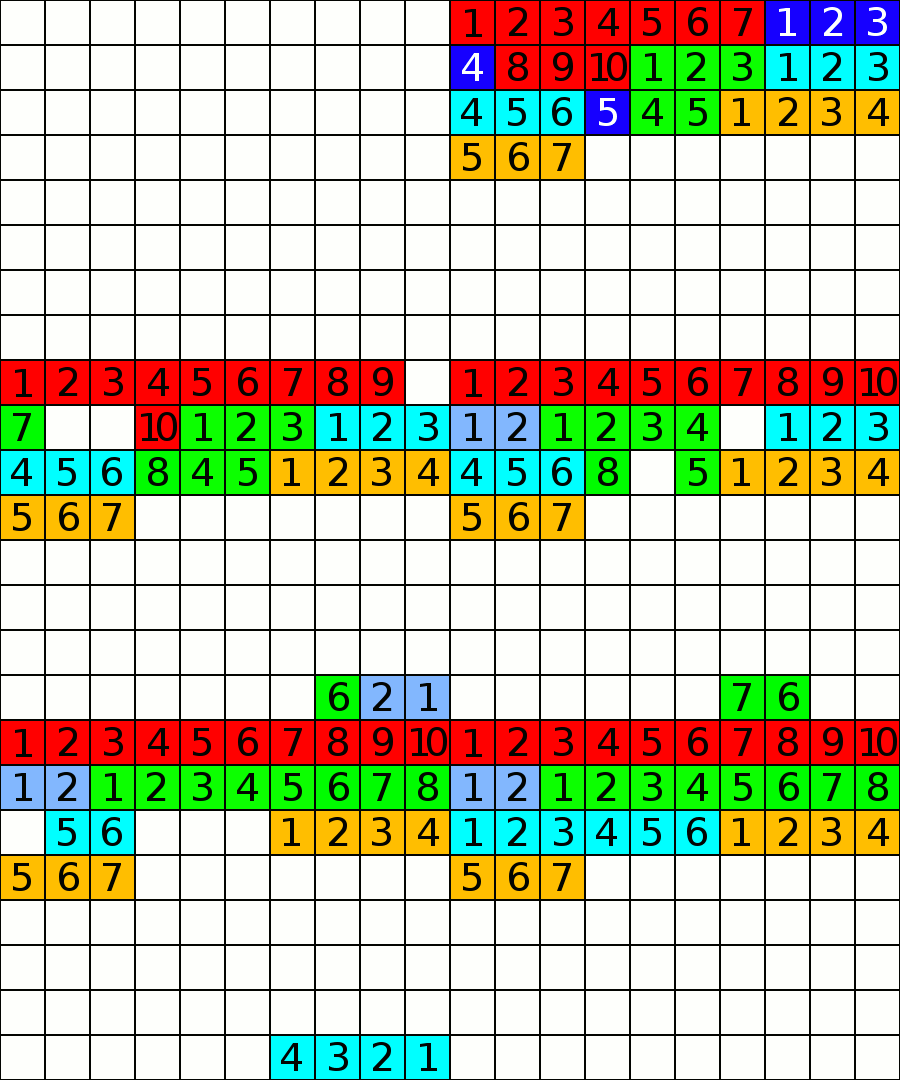
Well, now how to de-fragment the files on your hard disk drive..??
In, windows OS, we are provided with a default de-fragmenter. All you need to do is analyze the selected disk and defragment it. it takes few minutes to optimize your disk.
How to Defrag??
For Windows Users:
Follow this way..1)My Computer->
select any local disk of your choice
2)Right click..then Properties->Tools->Defrag now..!!enjoy..!!
Alternative:
Click Here to Download Raxco Perfect Diskor
Click here to Download Raxco Perfect Disk from another link
Comments
Post a Comment